

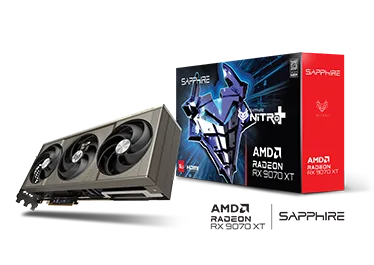


Radeon RX 9070 XT overview
The Radeon RX 9070 XT in this product record is the SAPPHIRE NITRO+ factory-overclocked 16GB model. This page is an evidence-led specification and compatibility reference based on the manufacturer’s published data. It is not presented as a BYT01 hands-on review, and it does not assign a performance score without a repeatable laboratory test.
SAPPHIRE positions this model as a large desktop graphics card for systems that can provide the required space, power capacity and cable clearance. The headline specification is 16GB of GDDR6 memory paired with a factory boost clock of up to 3060MHz. Buyers should evaluate the complete system rather than relying on the GPU name alone.
SAPPHIRE NITRO+ official specifications
The published specification lists 4096 stream processors and 64 compute units. Memory capacity is 16GB of GDDR6 running at 20Gbps across a 256-bit interface. The listed boost clock reaches up to 3060MHz, while typical board power is 330W. Actual operating clocks and power can vary with workload, cooling, firmware settings and the rest of the system.
- Graphics processor: AMD Radeon RX 9070 XT
- Stream processors: 4096
- Compute units: 64
- Memory: 16GB GDDR6
- Memory speed: 20Gbps
- Memory interface: 256-bit
- Boost clock: up to 3060MHz
- Typical board power: 330W
Dimensions and case compatibility
The verified card length is 330.8mm and the cooler occupies approximately 3.2 expansion slots. These dimensions make clearance checks essential. A case must provide enough length behind the front fans or radiator, sufficient thickness around neighboring PCIe slots, and room for the support bracket. Builders should also account for the power connector and its cable bend rather than measuring the card alone.
Before purchase, compare the manufacturer’s dimensions with the case specification and the actual internal layout. Front-mounted radiators, thick fans, drive cages and cable channels can reduce usable GPU clearance. Because component placement differs between cases, this page does not claim universal compatibility.
Power-supply and connector requirements
SAPPHIRE lists typical board power at 330W and recommends a power supply of at least 850W. The card uses a native 12V-2×6 power connector and includes a three-by-eight-pin adapter. Power-supply quality, available connector capacity and total system demand remain important even when the nominal wattage meets the minimum recommendation.
Use separate PCIe power leads where required by the power-supply manufacturer, seat every connector fully and preserve a safe cable bend radius. Do not force the side panel against the power cable. The most appropriate power supply depends on the processor, cooling system, storage devices, transient loads and any planned overclocking.
Interface and display connectivity
The SAPPHIRE NITRO+ card uses a PCI Express x16 interface. Official display connectivity includes DisplayPort 2.1a and HDMI outputs. The final monitor capability depends on the selected port, cable, display specification, resolution, refresh rate and supported display-compression features.
For a new build, confirm that the motherboard offers a suitable full-length PCIe slot and that the case layout leaves the card unobstructed. The card is listed for 64-bit Windows 10, Windows 11 and Linux environments, but driver availability and feature support should be checked for the intended operating system before installation.
What this specification can and cannot tell you
The Radeon RX 9070 XT specifications document memory capacity, clock targets, physical dimensions, power requirements and interfaces. They do not by themselves establish frame rates, acoustic performance, temperature, efficiency under every workload or value for money. Those conclusions require controlled testing with disclosed hardware, software, ambient conditions and repeatable workloads.
BYT01 has therefore classified this record as evidence-based analysis rather than a hands-on laboratory review. Local Saudi pricing and retailer availability have not been verified for this record, so no current price or purchase recommendation is shown.
Installation checklist
- Confirm at least 330.8mm of usable GPU length inside the case.
- Reserve approximately 3.2 expansion slots and check adjacent devices.
- Verify an appropriate PCI Express x16 motherboard slot.
- Use a quality power supply meeting the 850W manufacturer recommendation.
- Confirm the native 12V-2×6 cable or correctly installed included adapter.
- Leave adequate cable-bend clearance before closing the side panel.
- Install the current supported driver for the intended operating system.
Frequently asked questions
How much memory does the Radeon RX 9070 XT NITRO+ have?
This SAPPHIRE model has 16GB of GDDR6 memory rated at 20Gbps on a 256-bit interface.
What power supply does SAPPHIRE recommend?
The official specification lists a minimum 850W power supply. Total system demand and power-supply quality should still be considered.
Will the card fit in every PC case?
No. Its verified length is 330.8mm and it occupies about 3.2 slots. Measure usable internal clearance, including fans, radiators and the power-cable bend.
Has BYT01 benchmarked this exact card?
No repeatable BYT01 laboratory benchmark is attached to this product record. Performance claims and numeric scores are therefore intentionally excluded.
For a broader reference model, see the AMD Radeon RX 9070 XT product record in the BYT01 database. Compare board-specific dimensions, clocks and power requirements before choosing a card.
Primary source
Specifications were verified against the official SAPPHIRE NITRO+ Radeon RX 9070 XT product page. Recheck the manufacturer page and regional distributor terms before purchase because firmware, packaging, warranty and availability can vary by market.
Who should consider this Radeon RX 9070 XT?
The SAPPHIRE NITRO+ Radeon RX 9070 XT OC 16GB is aimed at buyers planning a powerful desktop rather than a compact, low-power system. Its 330W total board power, 330.8mm length and 3.2-slot cooler make case space and power delivery central parts of the buying decision. Those figures should be checked before performance expectations or visual design influence the purchase.
A sensible candidate has a well-ventilated mid-tower or larger case, an appropriate power supply and a monitor that can benefit from a high-performance graphics card. A user building a small-form-factor PC should be especially cautious. The Radeon RX 9070 XT may fit some compact cases, but clearance for the connector, side panel, front radiator and intake fans must all be measured rather than assumed.
Case clearance and physical planning
Start with the manufacturer dimensions and compare them with the case specification sheet. Card-length support can change when front fans or a radiator are installed, so the headline maximum GPU length is not always the usable figure. Allow extra room around the end of the card for installation and around the power connector so the cable is not pressed sharply against the side panel.
The 3.2-slot width also matters. Count the expansion slots available below the main PCIe slot and check whether other cards, capture devices or bottom-mounted fans occupy the same space. A thick graphics card can reduce airflow to adjacent components. Builders should also verify that the motherboard’s primary x16 slot is accessible and that the case provides adequate support for a long, heavy board.
- Confirm at least 330.8mm of usable internal length.
- Account for front radiators, fans and drive cages.
- Reserve more than three expansion-slot positions.
- Leave safe cable-bend clearance beside the power socket.
- Plan a support bracket if the installed card shows visible sag.
Power-supply checklist
SAPPHIRE lists an 850W power-supply recommendation for this model. Treat that as a system-planning reference, not as a statement that the card continuously consumes 850W. The complete PC also powers the processor, motherboard, memory, storage, cooling and connected devices. CPU choice, overclocking and transient load behaviour can change the margin required.
Wattage is only one part of power-supply selection. Build quality, connector condition, protection features, age and the available output on the required rails are equally important. Avoid mixing modular cables from different PSU models, even when the plugs appear identical. Pin assignments can differ and using the wrong cable can damage hardware.
The Radeon RX 9070 XT uses a 12V-2×6 input and includes a three-to-one 8-pin adapter according to the official specification. Insert the connector fully and inspect it from more than one angle before powering the system. Route the cable without a severe bend immediately beside the plug, keep it clear of fans and recheck the connection after moving the computer or replacing components.
Airflow and cooling strategy
The Radeon RX 9070 XT cooler can dissipate substantial heat only when the case supplies fresh air and removes warmed air efficiently. A practical layout normally combines unobstructed front or bottom intake with rear or top exhaust. The exact fan count matters less than a clear path through the chassis. Solid front panels, clogged filters and crowded cables can restrict that path.
After installing the Radeon RX 9070 XT, observe temperatures, fan speed and noise during the applications you actually use. A short synthetic test cannot represent every game or workload. Compare idle and sustained-load behaviour, and investigate sudden changes over time. Dust buildup, a stopped case fan, a changed fan curve or a warmer room can all alter results without any change to the graphics card itself.
Do not copy voltage, clock or fan settings from another system without validation. Individual cards, cases and ambient conditions differ. If tuning is attempted, change one parameter at a time, record the baseline and test stability in several workloads. Returning to default settings is the right first diagnostic step when crashes, visual corruption or unexpected resets appear.
Display connectivity and monitor matching
The official product page lists DisplayPort 2.1a and HDMI connectivity. The useful resolution and refresh rate still depend on the specific monitor, cable, display mode and software configuration. Before buying a cable, check the monitor manual and identify which input supports the desired mode. A connector with the correct shape does not by itself guarantee every advertised feature.
For multi-monitor setups, plan the complete arrangement rather than testing one display at a time. Note each screen’s resolution, refresh rate, colour format and input type. Docking devices, adapters and capture hardware can add their own limits. When troubleshooting, connect the display directly to the graphics card with a known-good cable and enable additional devices only after the basic link works.
Performance expectations should also match the monitor. For the Radeon RX 9070 XT, a high-refresh display creates a different workload from a standard-refresh screen, while increased resolution raises the number of pixels rendered per frame. Image-quality settings, ray-tracing options, upscaling and frame-generation support can materially change observed frame rates. Evaluate the games and settings that matter to you instead of relying on the product name alone.
Understanding the 16GB memory specification
The Radeon RX 9070 XT carries 16GB of GDDR6 memory on a 256-bit interface, with memory speed listed at 20Gbps. Capacity is useful context, but it should not be treated as a standalone performance score. A workload also depends on the graphics processor, software engine, driver, resolution, asset quality and the way memory is allocated.
For gaming, memory demand varies between titles and can change with texture packs, resolution and patches. For creative or compute work, confirm that the application supports the required operating system, graphics API and acceleration path. Some professional workflows depend on a specific plugin or certified configuration, so application documentation should be checked before purchase.
When comparing the Radeon RX 9070 XT, use like-for-like tests. The same game version, scene, quality preset, driver branch and system platform are needed for a meaningful comparison. Average frame rate alone can hide inconsistent delivery, so frame-time behaviour, minimum performance, noise and power should be considered where trustworthy measurements are available.
A careful installation process
Before installing the Radeon RX 9070 XT, shut the system down, switch off the power supply and disconnect the mains cable. Work on a stable surface, discharge static safely and keep screws organised. Remove the required case-slot covers before seating the card. Align the connector with the primary PCIe slot and apply even pressure until the retention mechanism engages.
Secure the bracket to the chassis without forcing the card into an angled position. Connect power only after confirming that the Radeon RX 9070 XT is fully seated. Keep the power lead and other cables away from fan blades. Reconnect the monitor to the discrete graphics card rather than the motherboard output, then power on and verify that all fans and cables remain clear.
If there is no display, avoid repeatedly cycling power without checking the basics. Confirm the monitor input, cable, Radeon RX 9070 XT seating, power connector and motherboard diagnostic indicators. If the system previously used another graphics solution, review firmware settings and driver state. Testing with default firmware settings can help separate a configuration issue from a hardware problem.
Drivers, firmware and first-boot checks
Use the graphics driver source recommended by the hardware vendor and operating-system provider. During initial setup, record the driver version and avoid installing several tuning utilities at once. A simple baseline makes later troubleshooting easier. Restart when requested and confirm that the operating system identifies the Radeon RX 9070 XT correctly before changing performance settings.
Firmware updates should be approached carefully. Do not flash a graphics BIOS simply because a newer file appears online. Confirm the exact model, part number, revision and vendor instructions first. Interrupting an update or using firmware intended for another board can leave the card unusable. If the system is stable and the manufacturer does not recommend an update for your situation, unnecessary flashing adds risk.
For the first validation pass, check display output, device detection, fan operation and stability at default settings. Then test a familiar game or application while watching temperatures and behaviour. Save screenshots or notes for the baseline. If a later driver or configuration change causes trouble, those records make it easier to identify what changed.
Troubleshooting common symptoms
A black screen can originate from the monitor input, cable, card seating, insufficient power, firmware configuration or driver state. Start with the simplest reversible checks. Use one monitor, one direct cable and default settings. Reseat connections only while the computer is powered down and disconnected. Change one variable per test so each result remains useful.
Unexpected shutdowns under load deserve immediate attention. Inspect the power connector, PSU cabling and system event logs, and return any overclock to default. Do not assume wattage alone proves that a power supply is suitable. Age, quality, connector use and the rest of the system load matter. Stop testing if there is heat damage, an unusual smell or a visibly compromised connector.
Visual artifacts or application crashes can be software- or hardware-related. Confirm whether the issue appears in more than one application, capture the exact error and test a known-stable driver configuration. Check system memory and CPU stability as well. If symptoms persist at default settings across several workloads, contact the retailer or manufacturer within the applicable support process.
Purchase verification checklist
Radeon RX 9070 XT product listings can reuse images or shorten model names, so match the exact item rather than the GPU family alone. For this page, the reference model is SAPPHIRE NITRO+ AMD Radeon RX 9070 XT OC 16GB, part number 11348-01-20G. Confirm that identifier on the seller page, invoice and packaging whenever it is available.
- Verify the exact model and part number.
- Check physical dimensions against the assembled case.
- Confirm the 850W PSU recommendation and required connector.
- Review the retailer’s return window and regional warranty terms.
- Check whether taxes, shipping or import charges alter the final price.
- Save the dated listing and invoice for support purposes.
Regional warranty, bundled items, packaging and availability may differ. A product photo is not a substitute for the written listing, and a marketplace seller may not provide the same support as an authorised regional channel. Ask for clarification before purchase when any critical detail is missing. Price should be recorded with a date and market because it can change quickly.
How to compare this card responsibly
When evaluating the Radeon RX 9070 XT, begin with your workload and total budget. Compare complete system cost, not only the graphics-card price. A larger case, stronger power supply or different monitor cable can affect the final expense. Also consider noise tolerance, desk placement and room temperature. A faster card is not automatically the better purchase if it forces unsuitable compromises elsewhere in the build.
For the Radeon RX 9070 XT, use independent reviews that disclose the test platform, driver, game version and measurement method. Prefer several sources over one chart. Results collected at different dates or settings may not be directly comparable. Separate measured data from projections, sponsored claims and user reports. For this BYT01 page, unverified benchmark or price figures are intentionally not presented as established facts.
Finally, compare the Radeon RX 9070 XT against your current system. If the processor, memory capacity, storage behaviour or cooling already limits the applications you use, replacing the graphics card alone may not produce the expected improvement. Monitor utilisation and frame-time data can help identify the active constraint, but the interpretation should cover several representative workloads.
Maintenance and long-term use
For stable Radeon RX 9070 XT cooling, keep filters and intake paths clean, but follow the case and component manuals before removing parts. Hold fans stationary when using controlled air so they are not driven at excessive speed. Inspect the support, cables and connector periodically, particularly after transporting the computer. Changes in temperature or noise are more informative when compared with the baseline recorded after installation.
Radeon RX 9070 XT driver updates can deliver fixes and application support, yet installing every release immediately is not mandatory for a stable production system. Read the release notes and preserve a rollback path. For an important work machine, test major changes when downtime is acceptable. Keep project files backed up independently of the operating-system drive.
If the Radeon RX 9070 XT is resold, keep the original invoice, accessories and accurate description of its condition. Remove personal software profiles from the system and avoid claiming performance that was not measured. Clear documentation benefits both owner and buyer and makes warranty or support communication more efficient.
Evidence-based conclusion
The SAPPHIRE NITRO+ Radeon RX 9070 XT OC 16GB combines a high listed boost clock with 16GB of GDDR6 memory and a substantial cooling design. Those specifications do not remove the need for careful system planning. The card’s length, slot width, 330W board-power figure, 850W PSU recommendation and 12V-2×6 connection should be checked as one compatibility package.
This page is designed as a product record and planning guide, not as a substitute for an instrumented review. No original BYT01 benchmark result is claimed here. Buyers should combine the official specification with current independent testing, local pricing and warranty information. That approach produces a more defensible decision than selecting a card from a single specification or headline score.
Product record and buying decision
This record brings published specifications, dated price evidence and testing status together without turning them into an untested recommendation.
Documented specifications and limits
- Brand
- SAPPHIRE
- Model
- NITRO+ AMD Radeon RX 9070 XT OC
- SKU
- 11348-01-20G
- Market
- Global official specification
- Availability at verification
- Current availability not verified
- Compatibility and interface
- PCI Express x16 graphics card; DisplayPort 2.1a and HDMI outputs; Windows 10/11 and Linux 64-bit support.
- Power or capacity
- 330W typical board power; minimum 850W power supply; native 12V-2x6 connector with included 3x8-pin adapter.
- Dimensions or form factor
- Large multi-slot graphics card; verify case clearance, support bracket space and power-cable bend radius before purchase.
- Published warranty
- Verify SAPPHIRE regional graphics-card warranty and distributor terms before purchase.
- BYT01 evidence status
- تحليل قائم على الأدلة
Before buying
- Match the name, SKU and region to the retailer page and box.
- Reopen the price URL and verify seller, stock and shipping cost.
- Verify BIOS, QVL, dimensions, power and connectors against the rest of the build.
Decision actions
Sources and update log
2026-08-25 | Official specifications verified | https://www.sapphiretech.com/en/consumer/nitro-radeon-rx-9070-xt-16g-gddr6
2026-09-01 | Typed compatibility verified: 330.8 mm, 3.2-slot ATX, 12V-2x6 | https://www.sapphiretech.com/en/consumer/nitro-radeon-rx-9070-xt-16g-gddr6
Evidence limit: this is a product record, not a hands-on review or numeric rating. Future measurements must disclose the sample source, method, conditions and repeatable results.
Same-category records to compare
These records share a category; this alone does not establish suitability for your needs or budget. Compare intended use, configuration and upgrade limits before choosing. Prices, when shown, are dated snapshots, not current offers or stock confirmation. A price difference is not a performance or value verdict.
| Product | Dated price snapshot | Snapshot difference | Snapshot date | Documented compatibility | |
|---|---|---|---|---|---|
 AMD Radeon RX 6750 XT AMD Radeon RX 6750 XT | — | Not comparable | — | GPU-family record; reference power specifications do not replace board-partner requirements | Compare |
 AMD Radeon RX 9060 XT AMD Radeon RX 9060 XT | — | Not comparable | — | GPU-family record; distinguish 8 GB and 16 GB variants; check exact board-partner requirements | Compare |
 AMD Radeon RX 9070 XT AMD Radeon RX 9070 XT | — | Not comparable | — | PCIe 5.0 x16; DisplayPort 2.1a and HDMI 2.1b platform support; Windows 10/11 64-bit and Linux x86-64. Physical outputs, length and slot width vary by partner card. | Compare |
 NVIDIA GeForce RTX 3060 Ti NVIDIA GeForce RTX 3060 Ti | — | Not comparable | — | GPU-family record; distinguish GDDR6 from GDDR6X variants and verify partner SKU | Compare |
Reviews and testing
No qualified hands-on review is linked to this record yet, so no score or Pros/Cons are displayed.
Product-record FAQ
Is verified pricing available for SAPPHIRE NITRO+ Radeon RX 9070 XT OC 16GB?
No verified price is available in this product record. Check the official or retailer source before buying.
Did BYT01 test this product hands-on?
Do not assume hands-on testing unless a qualified review and repeatable test method are linked. This record separates official specifications and market evidence from physical testing.
Does a specification match guarantee compatibility?
No. Use the compatibility builder, then verify motherboard support, BIOS, QVL, dimensions, connectors and the case manual before paying.
Source-checked specifications
- VRAM (GB)
- 16
- Graphics memory type
- GDDR6
- Published board/GPU power (W)
- 330
- Exact-card length (mm)
- 330.8
Manufacturer source · 2026-10-18 · Specifications, not BYT01 measurements.
Price and verification history
Each row is a dated snapshot from a direct retailer URL. Prices and availability may change. Automated checks preserve the last verified price when access is blocked or clear SAR data is unavailable.
No saved price snapshots yet.


